This week one of our Nexus Telemetry Fleet users got in touch. Their dish was reporting a failed hardware self-test. The Starlink app said everything was fine, a reboot changed nothing, and they wanted to know whether the problem was the dish, the app or us.
It was the dish. And it was the same reading I have had on my own terminal since July, when its GPS failed and performance never dropped.
So I went looking for what the self-test codes mean, and found that Starlink documents exactly one line of it. Its API documentation for enterprise integrators describes hardwareSelfTest as the “result of the hardware self test that the UT runs on boot”, with three possible values: no result, passed or failed. Nothing on what’s tested, nothing on the codes, and when one owner asked Starlink’s support chat, the answer was that the codes are for internal use only.
Everything past that one line comes from four places: the dish’s own software, which names the codes but doesn’t explain them; people who have taken these terminals apart; owners who have posted their codes and what Starlink told them; and our own dishes.
If you work at Starlink and any of this is wrong, I would greatly appreciate hearing from you.
Reading it on your own dish
You won’t find the self-test in the Starlink app. The app’s Debug data screen runs through a checklist of the terminal’s health (motors, temperature, Ethernet speed, obstruction) and has no line for the self-test at all. I exported the app’s raw debug data to check, and it isn’t in there either. The app probably collects it with everything else the dish reports. It just never shows it to you.
You can read it from the dish directly. On a computer connected to the dish’s network, open http://192.168.100.1 and click Diagnostics.
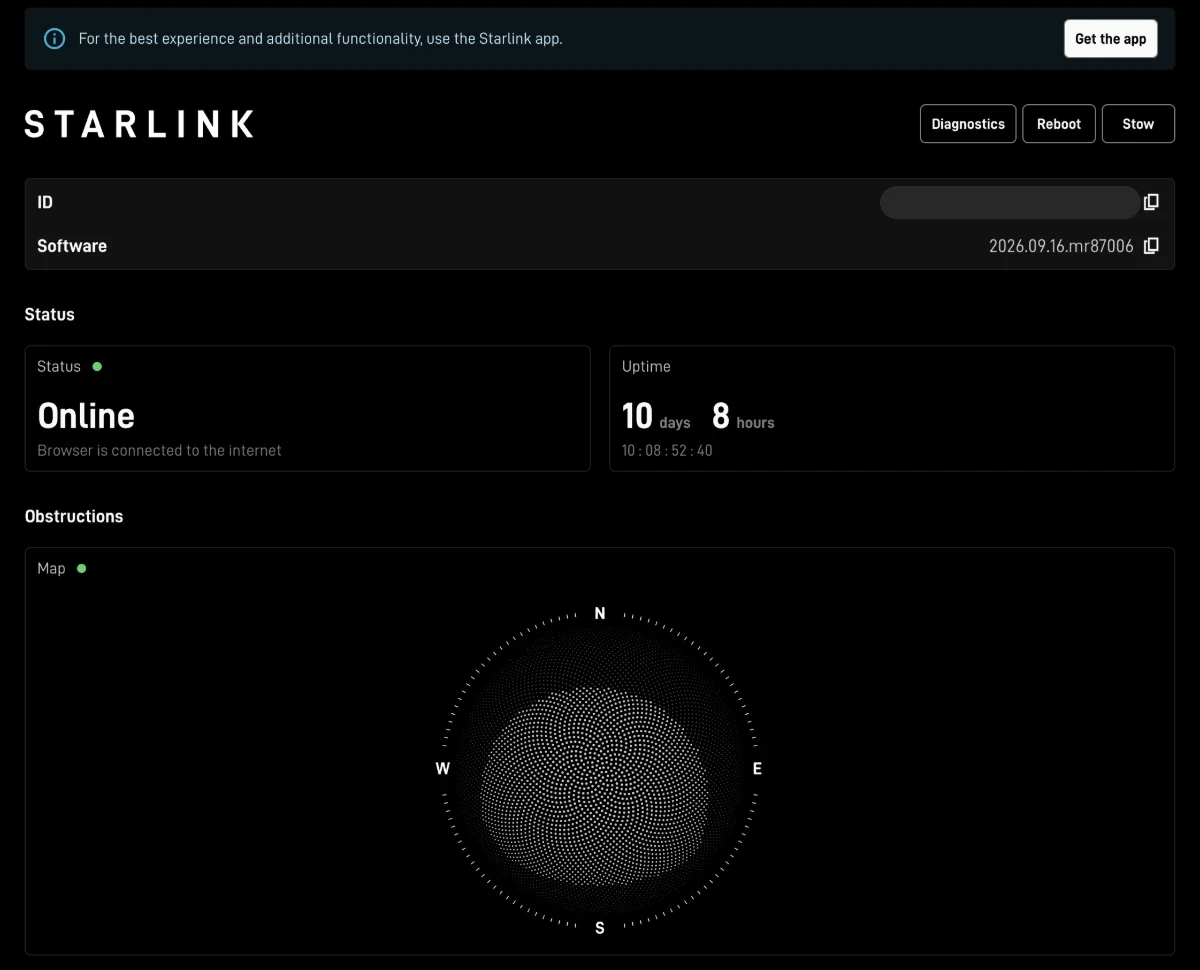
You get a block of raw JSON. The two lines that matter are hardwareSelfTest, which reads PASSED or FAILED, and hardwareSelfTestCodes, a list of numbers naming what failed. Here is mine:
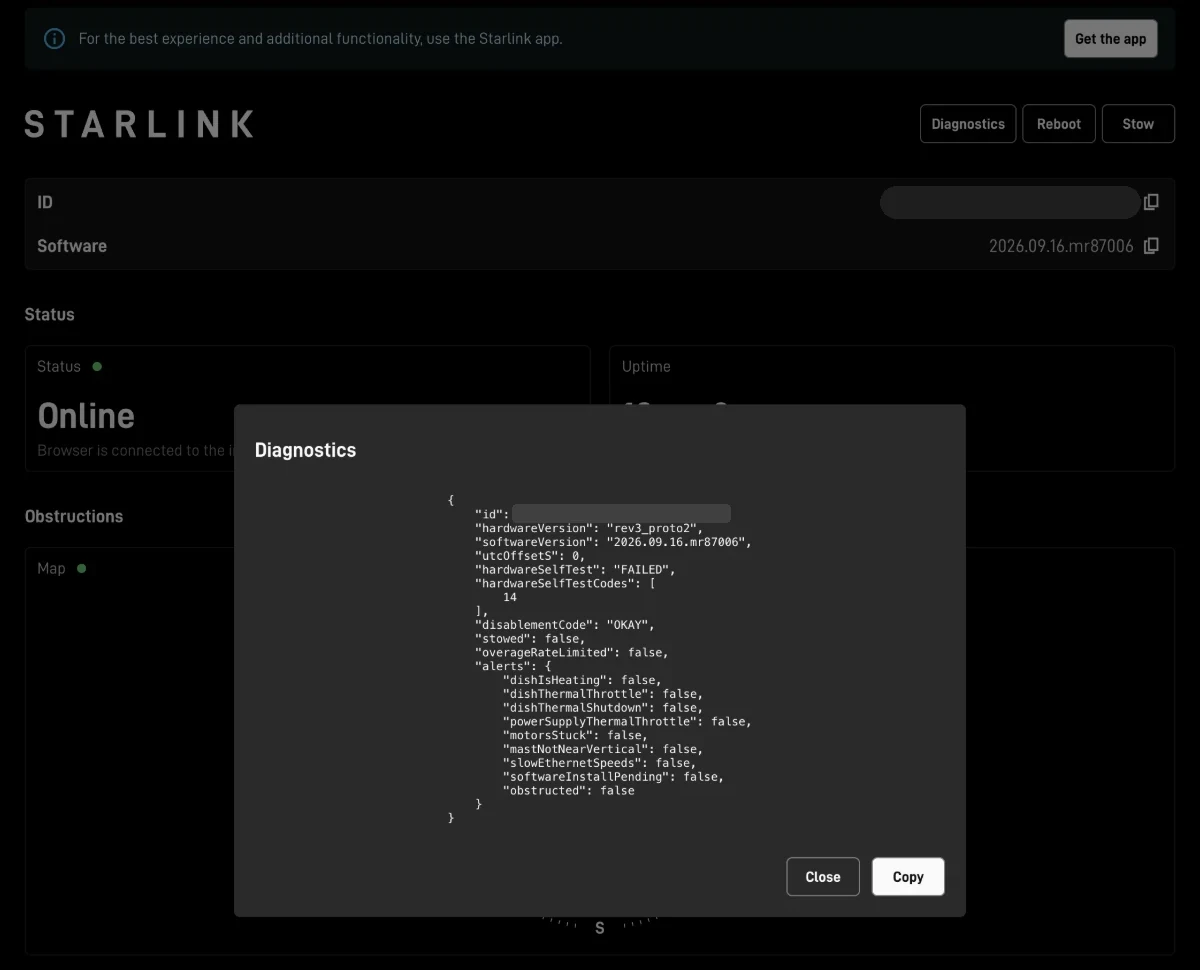
"hardwareVersion": "rev3_proto2",
"softwareVersion": "2026.09.16.mr87006",
"hardwareSelfTest": "FAILED",
"hardwareSelfTestCodes": [
    14
],
"disablementCode": "OKAY",
Everything else on that page says the dish is healthy. Every alert is false: no heating, no thermal throttle, no stuck motors, no obstruction. Only that one line reports a fault.
Three details if you check your own dish. Starlink says the test runs on boot, but some checks clearly re-run while the dish is up, because owners have watched a code come and go several times a minute. Older posts show the field as hardwareSelfTestCodesList. And the web page shows the codes as numbers, while gRPC tools such as grpcurl show them by name: code 14 on the page is GPS.
Where the names come from
The names are Starlink’s own, from the dish’s software. The dish describes its own interface over gRPC, and Jinwei Zhao at the University of Victoria keeps an open-source archive of it, taken from each firmware release and decoded, along with a changelog of what changes in each one. That’s how we know the codes arrived in firmware 2025.03.25, and it’s where the table below comes from. The full list is here.
Most of what is known about the inside of the dish comes from two sources. Oleg Kutkov repairs and documents Starlink terminals, and Lennert Wouters of KU Leuven took one apart for his Black Hat 2022 talk on the dish’s security. The phased array is driven by digital beamformer chips, 16 of them on the rev3 dish and 6 on the Gen 3 Standard, and each beamformer runs a set of front-end modules, the small transmit and receive amplifiers behind the antenna elements. On a rev3 that’s several hundred front-end modules in one panel. The GPS receiver is an ST Teseo chip, and according to a Linux kernel patch the motion sensor is an ST ISM330DHC accelerometer and gyroscope.
Kutkov also describes how the dish checks its array. The firmware asks each beamformer chip for its status, and each beamformer counts the front-end modules on its bus and exchanges calibration data with them. If a beamformer doesn’t respond, the dish logs an “AAP” error. If the front-end modules don’t answer properly, it’s an “RF” error. That looks a lot like codes 3 and 4, though the link is ours, not his.
The codes
The names are Starlink’s. The second column is what the name most likely covers, from the teardowns and standard engineering terms. Where it’s our inference rather than a source, the row says so.
| Code | Starlink’s name | What it most likely covers |
|---|---|---|
| 0 | GENERAL | Not documented. In every report we found it appears alongside another code |
| 1 | BOOT_UP | Start-up checks |
| 2 | CPU_VOLTAGE | The main processor’s supply voltage |
| 3 | DBF_AAP_CS | A beamformer chip not responding, Kutkov’s “AAP” error (our inference). The “CS” part is not documented |
| 4 | DBF_NUM_FEMS | The beamformers counting fewer front-end modules than expected |
| 5 | DBF_READ_ERRORS | Errors reading from the beamformer chips |
| 6 | DBF_T_DIE_0 | A beamformer chip temperature reading (our inference) |
| 7 | DBF_T_DIE_1 | A second beamformer chip temperature reading (our inference) |
| 8 | DBF_T_DIE_0_VALID | Whether the first reading is valid (our inference) |
| 9 | DBF_T_DIE_1_VALID | Whether the second reading is valid (our inference) |
| 10 | ETH_PRIME | The primary Ethernet port. “ethprime” is the standard bootloader name for it, and it appears in the dish’s own boot log |
| 11 | EIRP | Transmit power (effective isotropic radiated power) |
| 12 | FEM_CUT | The front-end modules’ silicon revision. Chipmakers call a revision a “cut” (our inference) |
| 13 | FUSE_AVS | Adaptive voltage scaling, which Kutkov documents on the rev3’s power chips. “FUSE” is probably the settings burned in at the factory (our inference) |
| 14 | GPS | The GPS receiver |
| 15 | IMU | The inertial measurement unit: tilt and orientation |
| 16 | PHY | A physical-layer interface. Whether Ethernet or radio is not documented |
| 17 | SCP_ERROR | Not documented. SCP also appears in the dish’s own list of subsystems it reports as ready, beside AAP and RF. In Arm-based systems like this one, an SCP is usually a small system control processor |
| 18 | TEMPERATURE | A temperature check |
| 19 | VTSENS | Not documented. Probably an on-chip voltage and temperature sensor |
What owners have seen
The table tells you what a code is called. What it means for your connection is a different question, and the only evidence is people who have seen these codes and reported what happened next. I found reports for six of the twenty codes. The other fourteen, as far as I can tell, nobody has posted about.
Code 4, beamformer front-end modules. The one I saw most, usually paired with code 0. One owner saw 0 and 4 with no performance issues at all, took it to Starlink support, and was told the terminal was operating normally. I asked in the thread whether anything had degraded, and it hadn’t. A French owner has had 0 and 4 on a Gen 3 Standard since the day it was installed, with the service working very well. Another owner, whose old Gen 1 dish showed code 4, was sent a new Gen 3 by Starlink, and the replacement came out of the box reporting FAILED with 0 and 4, and works fine. One owner had code 4 appear only on very cold days, clearing when the dish warmed up in the sun or with pre-heating on, and eventually got the dish replaced.
Code 14, GPS. Mine. The GPS receiver on my dish has seen zero satellites since July (gpsValid: false, gpsSats: 0) through a reboot, a full power cycle and several firmware updates. The connection hasn’t been affected. A German owner reported the same code with the same result, “Starlink still works without its GPS”, and Starlink sent a new dish anyway, with a €50 voucher. Another owner had 15 to 50 percent packet loss, and someone in their thread suggested code 14. So code 14 has turned up on dishes that work perfectly and on a dish that didn’t, and the self-test alone doesn’t tell you which you have.
Kutkov’s repair notes don’t match what my dish does. He found that a rev3 without a valid GPS signal gets stuck at “booting”, and Starlink’s own help pages describe the dish looking for a GPS signal for up to 15 minutes. My rev3 has booted many times since July with no GPS at all. Kutkov also points out that the app’s Starlink positioning setting, which I come to below, exists for exactly the case where the GPS receiver is broken. So the firmware has a way round a dead GPS. What I can’t tell from the outside is whether my dish takes it on its own or something else is going on.
Code 15, IMU. One owner saw it flicker between passed and failed several times a second on a Gen 3 Standard. Another saw it on a car-mounted Starlink Mini while moving, clearing when stationary, with the dish working fine on the move. A third saw it alongside dropouts several times a week and an orientation warning in the app, with the dish not having moved. My reading is that the orientation check fails when a dish set up as stationary is moving, which would make it expected in most cases, but the third report shows it isn’t always harmless.
Code 10, Ethernet. One owner had the Ethernet link fall back to 100 Mbps. The cable was faulty, Starlink sent a new one, and the problem went away. Another, on a Gen 1 dish, watched the download fall towards zero with code 10 showing until the dish died completely, and Starlink replaced the kit.
Code 2, CPU voltage. Intermittent on a Gen 1 dish, several times a minute, with no effect on service. The owner suspected the power injector.
Why a failure can be real and still not matter
In most of these reports, the self-test says something failed and the connection carries on regardless. One developer building a network monitoring tool logged a dish for 30 days that reported FAILED the entire time “while nothing is wrong”, and ended up alerting only when a dish changes from passed to failed. There are two reasons a failure can be real and still not matter.
The first is scale. A phased array is hundreds of small elements working together, and losing some of them costs surprisingly little. The phased array chapter of Skolnik’s Radar Handbook, written by Cheston and Frank, notes that graceful degradation “has been claimed, since the failure of as much as 10 percent of the components leads to a loss in gain of only 1 dB”, with some cost in sidelobes. On a clear day with margin to spare, one decibel is not something you would notice. A code 4 is quite possibly the dish counting its front-end modules, finding a few fewer than expected, and working with the rest.
The second is that the dish doesn’t depend on its GPS as much as you’d think, and Starlink says so in its own app. On the Debug data screen there’s a setting called Use Starlink positioning exclusively:
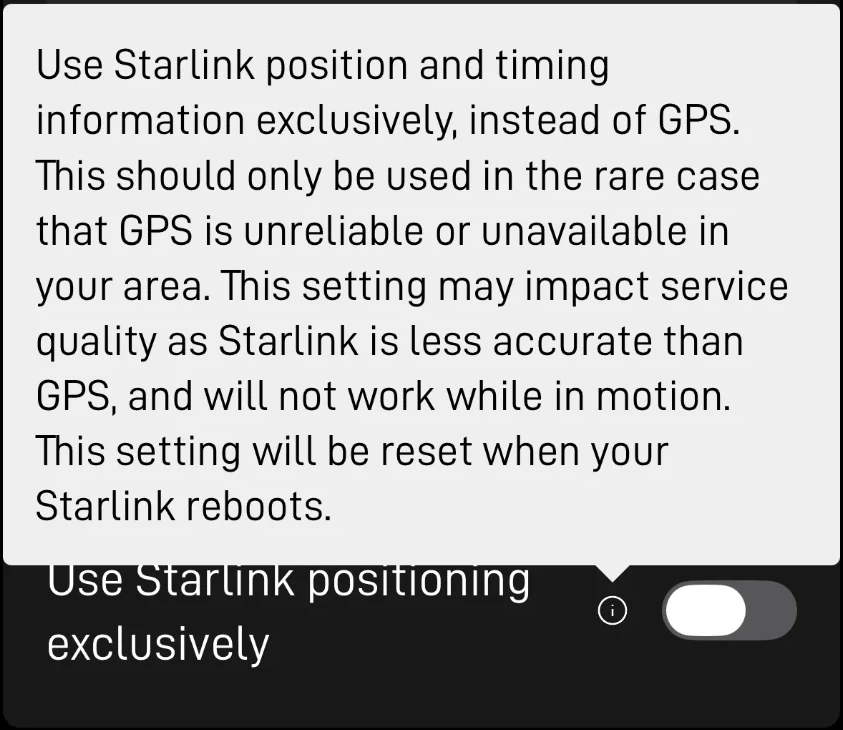
Use Starlink position and timing information exclusively, instead of GPS. This should only be used in the rare case that GPS is unreliable or unavailable in your area.
So the dish can work out where it is from the constellation itself. In a May 2025 filing to the FCC, SpaceX made the same case: as GPS World reported it, Starlink terminals can already provide “meter-level positioning by using time-of-arrival measurements from its satellites”, without relying on GPS. On my dish the setting is off, the GPS sees nothing, and the dish’s own positioning filter still reports FILTER_CONVERGED. My reading is that it falls back to Starlink positioning on its own when the GPS fails. Starlink doesn’t say that, but it is what the dish appears to be doing.
Moving dishes are different
The same setting comes with a warning: Starlink positioning “is less accurate than GPS, and will not work while in motion”. Kutkov’s explanation is that positioning from the constellation is slower and takes more work, and on the move the errors build up faster than the dish can correct them. For a fixed dish like mine, a dead GPS costs nothing I can measure on the link, though the dish no longer reports its own location. On a vehicle or a vessel, the fallback isn’t there, so a code 14 on a moving terminal deserves more attention than the same code on a roof.
And some failures clearly are real. The Ethernet cases were a bad cable and a dying dish, and in both the owner could see the connection getting worse.
Measuring it
Everything above assumes “the service is fine”, mine included. Most people judge that by feel, or by a speed test on a good evening, and neither tells you much about a slow decline. If you have never measured your dish, you can’t know whether a failed part has cost you anything.
I can say mine hasn’t changed because Nexus Telemetry Pro was recording it every second before the fault appeared and has kept recording since. Latency to the Starlink point of presence sat at 26 ms before the GPS died and sits there now. Without that history I would be guessing.
What to do if yours says FAILED
If the numbers say the service is fine and the dish doesn’t move, note the code, keep an eye on it, and carry on. There is very likely enough redundancy in the unit to work around the failed part, and Starlink support will most likely tell you the terminal is operating normally.
If you see a failed self-test alongside a real drop in performance (dropouts, packet loss, speeds falling, a link stuck at 100 Mbps), contact Starlink. Give them the code, the hardware version and the software version from the diagnostics page. With those details, you don’t have to describe a fault the app says isn’t there.
How we show it
Nexus Telemetry Pro has read the self-test on a single dish since July, and shows a failure the moment it appears, with the failing codes named.
Nexus Telemetry Fleet reads it from every terminal in a fleet, every five minutes. A failed self-test shows on the terminal’s header with the code named, and on the status page the collector serves on the site’s own network. Each terminal’s Diagnostics view lists its components with the dish’s own verdict and the figures behind it: the self-test and the codes it named, the GPS receiver’s fix and satellite count, the phased array, motors, thermal, Ethernet, power and the rest. Fleet prints the dish’s name for a code, GPS rather than 14, and doesn’t claim to know more than the dish says.
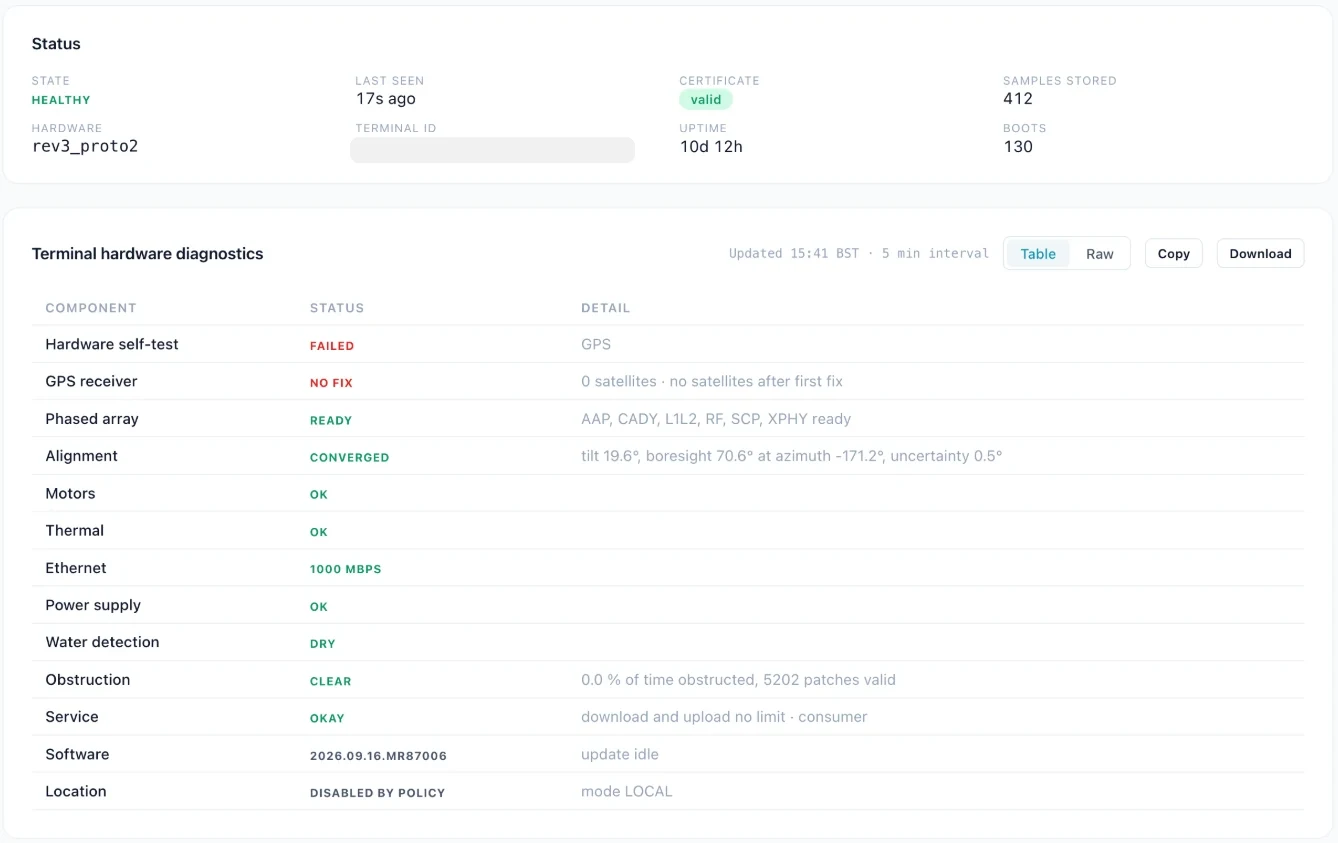
Switch the view to Raw and you see exactly what the dish returned. Download saves it as a zip, including the dish’s own interface description, so you can hand it to Starlink support or read through it yourself with grpcurl.
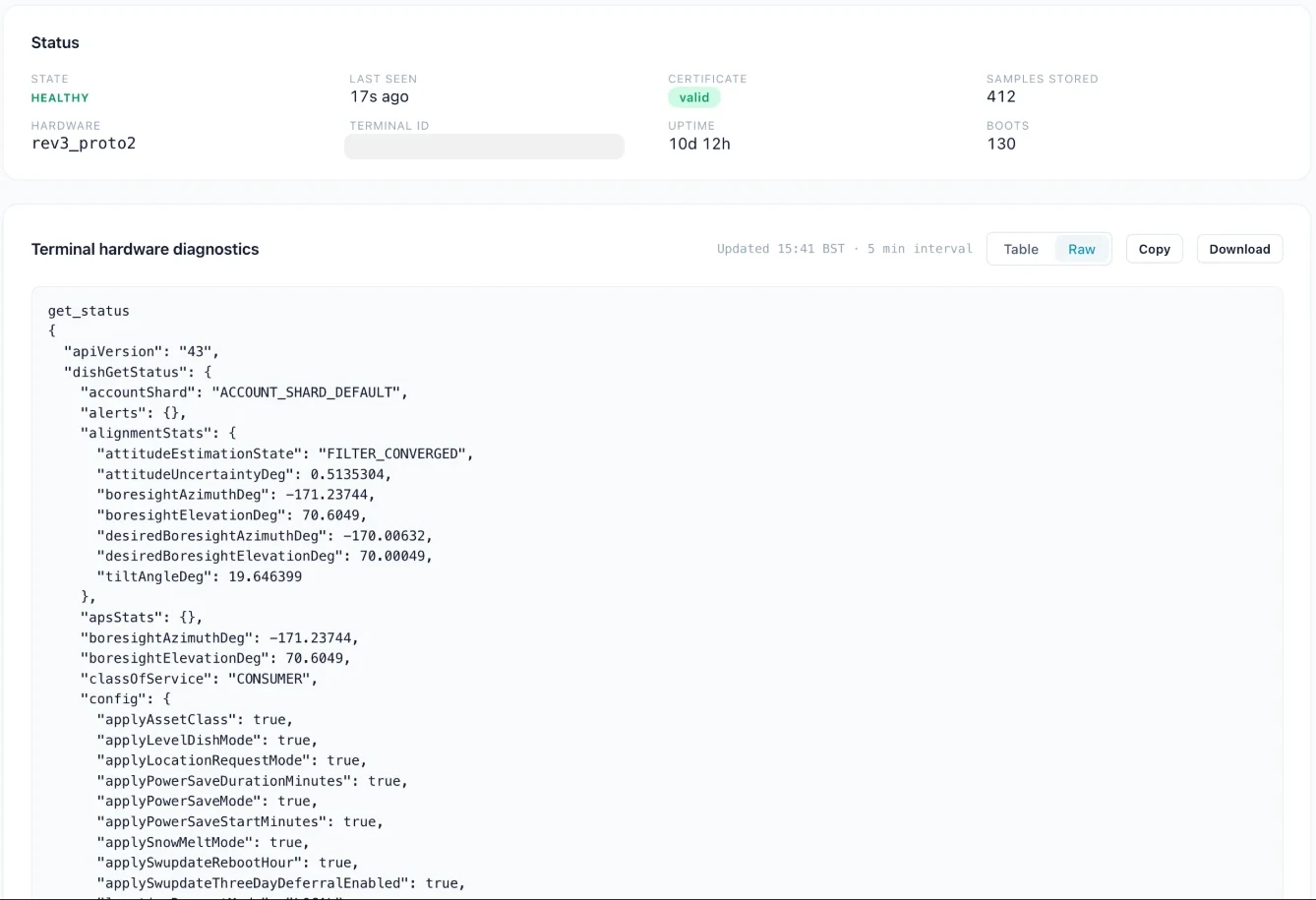
A failed self-test doesn’t change a terminal’s status on its own. Mine reads Healthy with the failed self-test right below it: a failed part, and a connection that works. Fleet also measures each terminal against its own last 6 hours, so a dish whose latency or drop rate stays above what is usual for it for 15 minutes reads Warning on the dashboard, with the cause named. A failed self-test next to a terminal drifting from its own baseline is the combination worth a support ticket. Longer-term trend analysis for the slow declines, and side-by-side comparison with similar dishes in the same fleet, are what we are building through early access.
This guide is pieced together from the dish’s own software, published teardowns, owners’ reports and our own testing, because Starlink doesn’t publish the codes. Some of it may be wrong, or go out of date as the firmware changes. If you spot an error or have a report to add, corrections are very welcome by email.
Nexus Telemetry is built by Liquidbinary Ltd. Follow @nexustelemetry on X or subscribe to the newsletter for new posts.