Update - September 2026: The GPS module has failed its self-test on every firmware release since this was written, most recently 2026.09.16, and the connection is still unaffected. Starlink's own app confirms the dish can position itself without GPS. The wider picture, every self-test code and what other owners have seen, is in Starlink's Hidden Hardware Self-Test: What the Codes Mean.
The satellite count on my dashboard read zero. Not low, not fluctuating. Zero, and holding there.
Every other number on the screen was fine. Latency to the Starlink point of presence sat at 26ms. Download and upload were flowing. Zero drop rate, zero obstruction, signal well above the noise floor, ethernet negotiated at a full gigabit. By every measure that matters for actually using the connection, the dish was healthy. But it had no idea where it was, and it had stopped trying to find out.
The official Starlink app, of course, showed a green tick and a speed number. It always does.
What every official screen said
Before I get to what Nexus Telemetry found, it’s worth showing what the terminal was telling everyone else, because the contrast is the whole point.
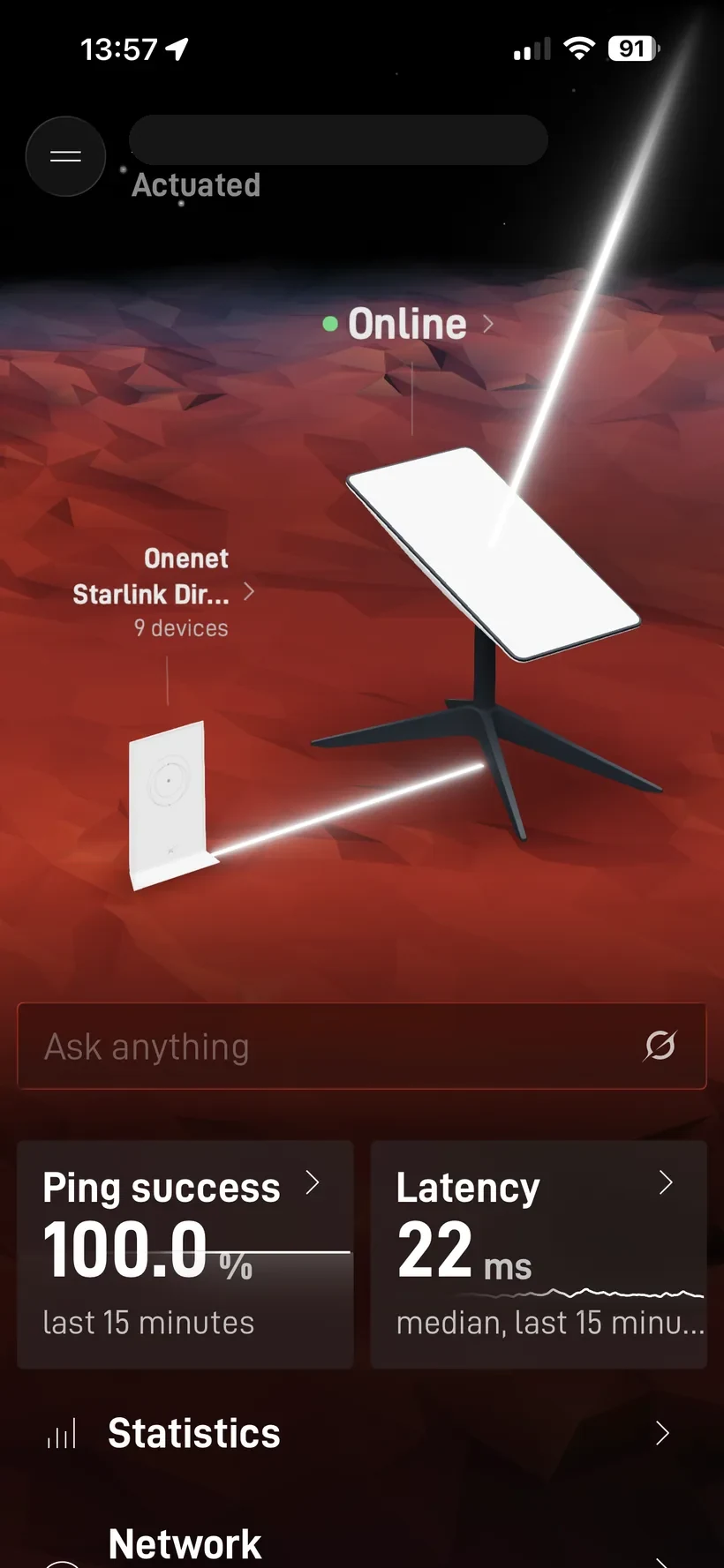
The Starlink app’s home screen was a picture of health. A green Online dot, ping success at 100.0% over the last fifteen minutes, latency at a median of 22ms. Nothing you would ever screenshot in concern.
So I went into the app’s own Debug data screen, the one that exists precisely to surface problems. It runs a checklist of the terminal’s health, and every single item was green. Not stowed. Normal signal. Normal Ethernet speeds. Normal temperature. Motors healthy. Mast near vertical. At service location. Not heating. Not sleeping. Ping drop rate a clean 0.0%.
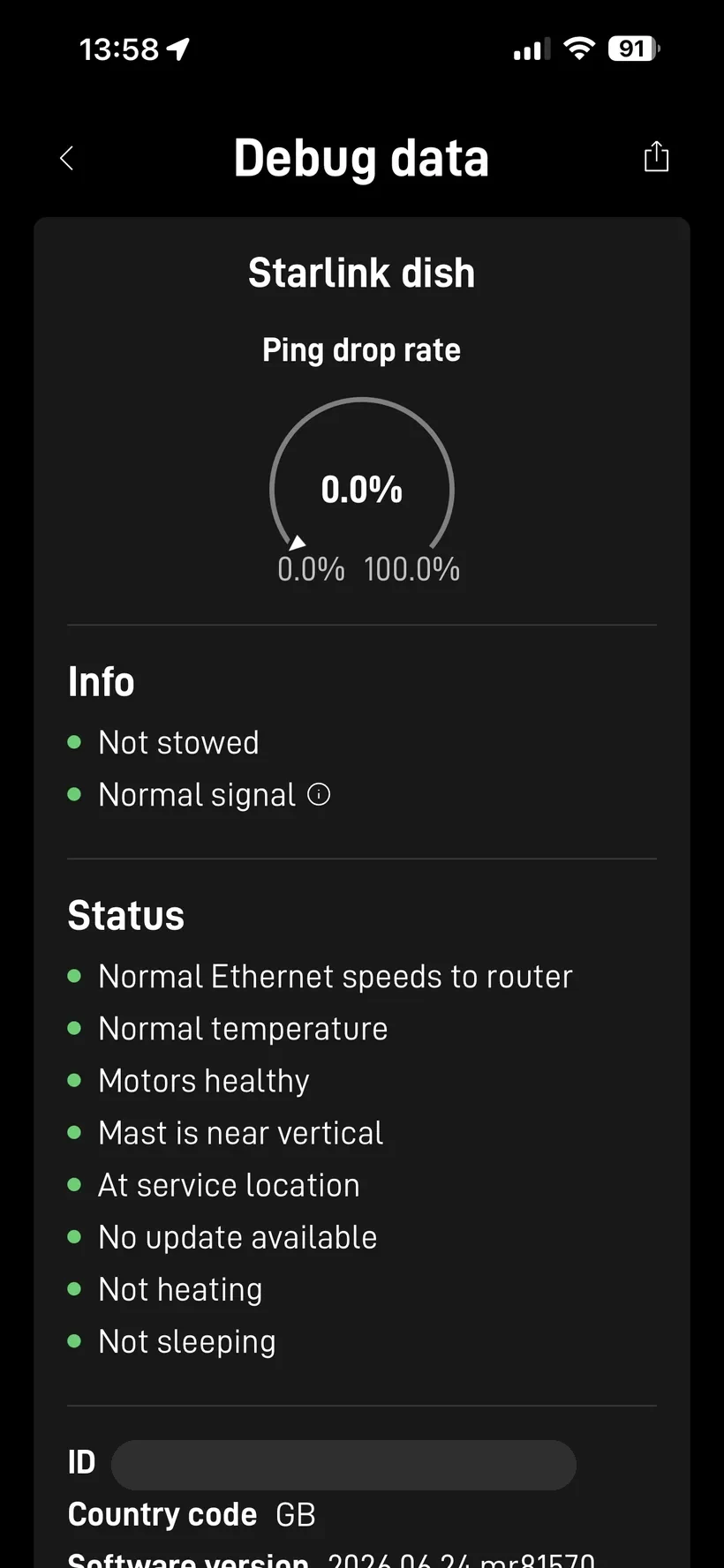
A full green checklist, on the same dish, at the same moment its GPS module was reporting a hard failure. The debug screen simply has no line for the hardware self-test.
I went one step further and exported the app’s raw debug data to dig through the JSON by hand. It carries the raw status fields, including the GPS block, so the symptom is technically in there: gpsSats: 0, noSatsAfterTtff: true. But there is no self-test result anywhere in the export, and no code naming GPS. The self-test comes from a separate diagnostics endpoint, and nothing the app shows or exports includes it. So even the most thorough thing the official app offers gives you the symptom buried in raw JSON, and never the diagnosis.
What Nexus Telemetry showed me
I run Nexus Telemetry against this dish continuously, so the zero satellite count stood out immediately against the history. Pulling up the raw GPS fields from the status response told the first part of the story:
gps_valid: false
gps_sats: 0
no_sats_after_ttff: true
pnt_filter_convergence_state: FILTER_CONVERGED
no_sats_after_ttff is the interesting one. TTFF is time to first fix, the moment a GPS receiver is expected to have locked onto enough satellites to compute a position. This flag being true means the dish went through that window and came out the other side with nothing. It tried, the clock ran out, and it saw no satellites at all.
That is not what a temporary sky obstruction or a passing cloud looks like. Zero satellites after TTFF, held steady, is the signature of a receiver that isn’t receiving.
The dish knew exactly what was wrong
Here is the part that made this worth writing about. The dish had already diagnosed itself. It just never said so out loud.
Starlink terminals expose a get_diagnostics endpoint over the local API, separate from the main status stream. Buried in it are two fields most tools never read:
hardware_self_test: "FAILED"
hardware_self_test_codes: ["GPS"]
The dish runs a hardware self-test, and when I queried it, the result was a flat FAILED with a single code naming the culprit: GPS. The terminal knew its GPS module had failed. It had known, presumably, since boot. And nothing anywhere surfaced it.
I checked everything else the dish reports for a problem signal. disablement_code was OKAY. Every entry in the alerts block, the one that flags thermal shutdowns, stuck motors, obstruction, water detection, was false. There was no outage, no warning, no advisory in the event log. The one and only place on the entire terminal that admitted something was broken was that self-test code, in an endpoint the official app doesn’t show and most third-party tools don’t fetch.
To find it the first time, I had to run raw gRPC queries against the dish by hand. That is exactly the kind of thing Nexus Telemetry is supposed to make unnecessary, and until this week, it didn’t.
Zero performance impact, and why that makes sense
The genuinely surprising part, and the reason a dead GPS module can hide for so long, is that it changes nothing about the connection.
Latency averaged 26ms to the PoP, right in the normal band. Throughput was unaffected. The drop rate was flat. And critically, the dish’s attitude filter was still converged, reporting an orientation uncertainty of 0.39 degrees, with the boresight sitting within about a degree of its intended target. The dish still knew precisely where it was pointing.
Look again at that PNT filter line: pnt_filter_convergence_state: FILTER_CONVERGED. PNT is position, navigation and timing. The dish’s positioning and timing solution was converged and happy, even though its dedicated GPS receiver was returning nothing.
I’m speculating from the outside here, the same way I did when my dish silently rotated 190 degrees a few months ago, but the picture is consistent. A Starlink terminal does not appear to lean on its own GPS chip to run the link. It gets timing and scheduling from the network, and it can resolve its position and attitude from the satellite signals themselves. The dedicated GPS module looks like a convenience, a fast independent fix for the location field in the API, rather than a dependency for the phased array to do its job. When it dies, the constellation side of the house carries on as if nothing happened.
Starlink’s own app backs this up. Tucked away on the Debug data screen is a setting to use Starlink’s own positioning instead of GPS, for when GPS is unreliable or unavailable. Mine is switched off, and the dish still knows where it is.
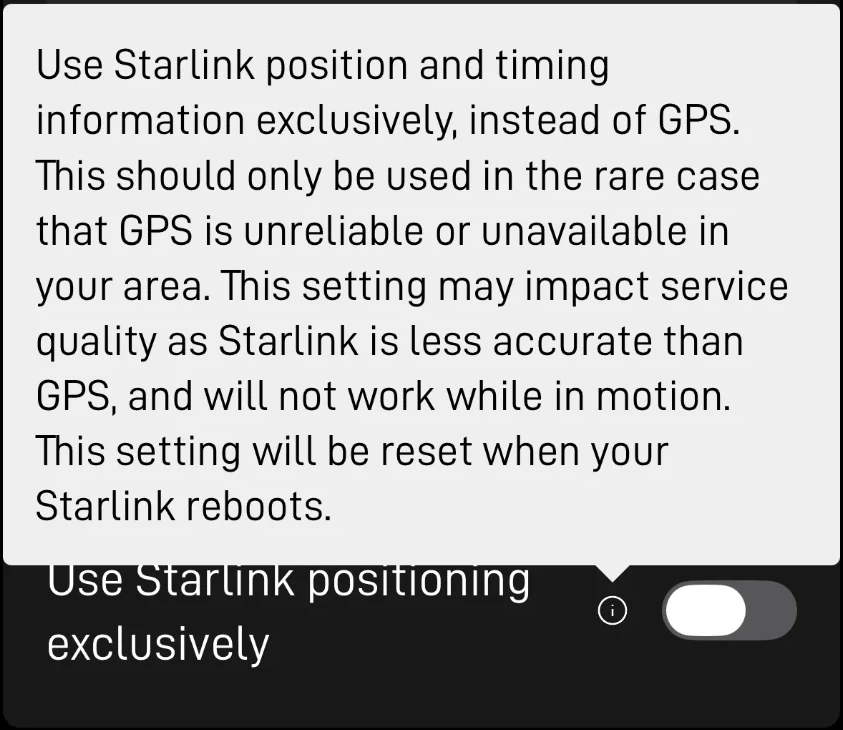
For a fixed installation that is reassuring. The one thing you lose is the dish’s own sense of place, and that has a knock-on effect worth noting.
The location field went dark
With the GPS module dead, the dish stopped reporting its own coordinates. In the diagnostics, the location block came back disabled with latitude, longitude and altitude all at zero. The terminal simply had no position to give.
This is precisely the failure mode we built multi-source GPS to survive. Nexus Telemetry can take location from the dish, or from an external receiver, or from a position you set manually on the map, and fall back automatically when a source drops out. So while the dish had lost its fix, the app carried on showing the correct location from a manual source. If I had been relying on the dish alone for positioning, whether for logging, for a mobile setup, or for anything that keys off location, a hardware GPS failure would have quietly taken it out with no explanation on screen. Redundancy in the location source turned a silent outage into a non-event.
What we built in response
We had the data to catch this. What we didn’t have was any surfacing of it, which meant it took a hand-typed gRPC query to find. That gap is now closed.
Nexus Telemetry Pro now reads the hardware self-test on a background cycle, from version 1.0.10, and surfaces a failure the moment it sees one. When the self-test reports FAILED, you get a clear warning in the header next to the health score, a warning entry in the alerts log, and, because the code named GPS, a hint right on the satellite count explaining why it reads zero. Open the diagnostics detail and the failing codes are listed verbatim.
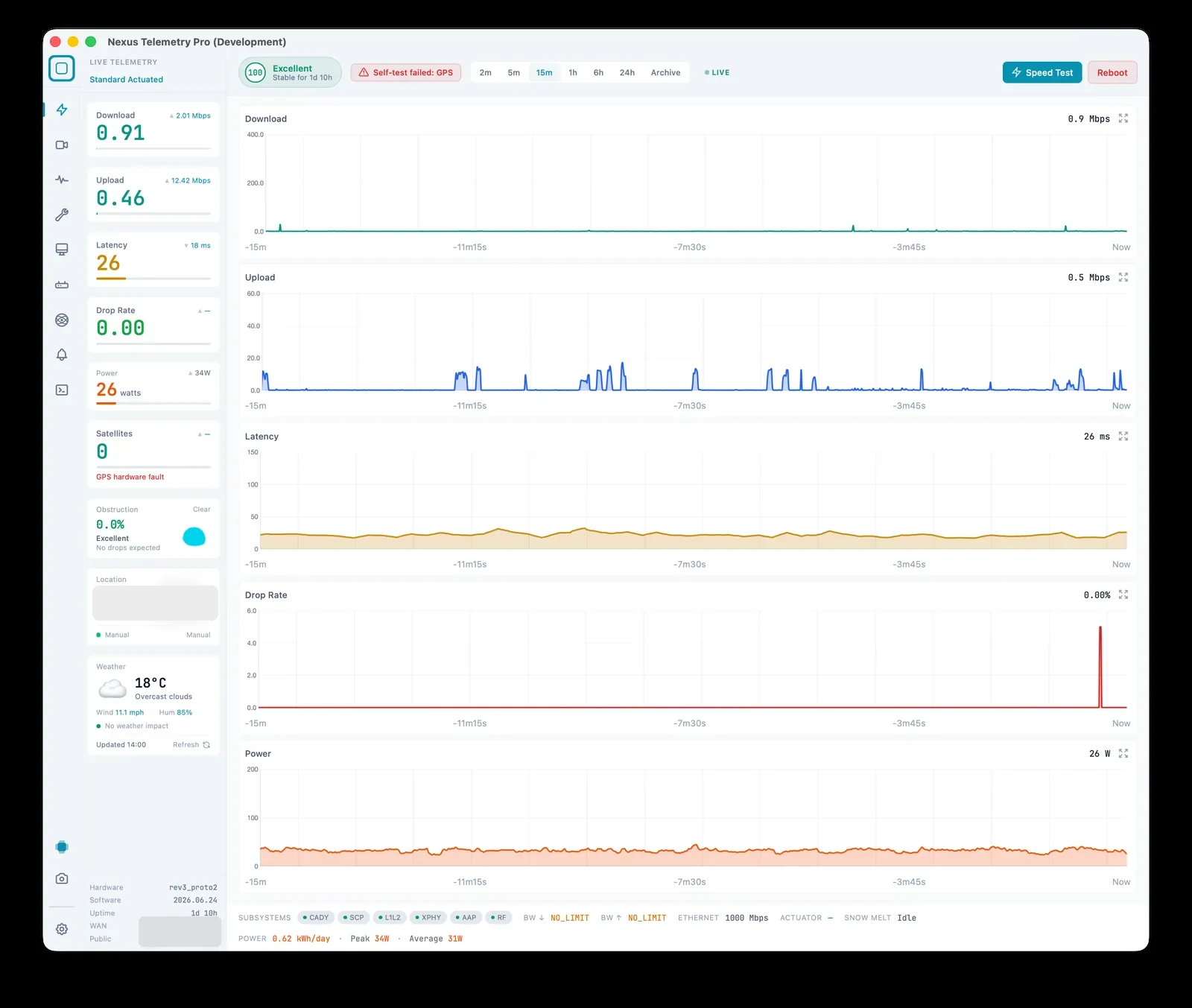
That last word matters. There is no hard-coded list of subsystems anywhere in this. The dish reports failed subsystems by name, and Nexus Telemetry shows whatever it reports. Today that is GPS. If a future firmware adds a self-test for a motor, a thermal sensor or anything else, it will surface with the same treatment and no change on our side. We are showing you what the terminal says about itself, not our guess at what might go wrong.
The self-test is also re-checked every time the dish goes offline and comes back, because a reboot is exactly when this state changes.
The verdict, and why I’m waiting
The standard first move for a self-test fault is a reboot, so I tried one. It changed nothing. The dish came back up, ran its self-test, and failed it again. Zero satellites, same GPS code.
So I stopped being gentle and pulled the power entirely, a full hard power cycle rather than a soft reboot. Same result. The dish booted, self-tested, and reported FAILED on GPS once more.
Nexus Telemetry re-checks the self-test every time the dish drops offline and comes back, so I watched it happen on each power cycle. The terminal reconnected, the diagnostics re-ran, and the GPS code was still there. No recovery, no flicker, just the same fault surfacing again the moment the dish was back online.
A fault that survives a full power cycle is not a transient glitch. And I can rule out anything environmental or account-related, because my Starlink Mini, sitting at the same site on the same connection, holds a perfectly healthy GPS lock. Same sky, same location, one dish blind and one seeing fine. The only variable left is the terminal itself.
That points hard at the hardware, but I’m not calling Starlink just yet. Not every self-test failure is a dead chip. Sometimes a driver or an initialisation path breaks in a way a new firmware build can repair, and forcing a hardware swap for something an update could clear would be premature. So the plan is to give firmware a chance first.
This is where the continuous monitoring earns its keep. Nexus Telemetry logs every firmware version the dish runs and re-checks the self-test on every reboot, so the moment a new build lands I will know within a poll cycle whether it cleared the fault. If it does, that is a firmware bug caught with a precise before and after. If the next few updates come and go with GPS still failing, then it is hardware, and I will have a clean, timestamped record to take to support rather than trying to describe a problem their own app insists isn’t there.
This is what Nexus Telemetry is for
A dead GPS module is a small, quiet failure. It does not drop your speed, trip an alert, or show up anywhere in the official app. You could run for months with a failed subsystem and never know, right up until the day it matters, when you move the dish, or your logs need a location, or the fault spreads to something that does affect the link.
The whole point of Nexus Telemetry is that the dish is broadcasting all of this locally, every second, whether or not anyone is listening. The self-test result, the raw GPS fields, the attitude solution, the diagnostics endpoint the app abstracts away. We connect straight to the terminal on your local network and show you what it actually says, including the parts it would rather keep to itself.
It runs on Mac, Windows and Linux, and you can try it with a free trial at nexustelemetry.com.
More to come as I keep digging into what the telemetry reveals. If you care about Starlink beyond is it fast enough, follow @nexustelemetry on X or subscribe to the newsletter for new posts.